Showing posts with label FAIL. Show all posts

Tuesday, April 10, 2018

UPDATED: FAIL: How Passage Technology's Storage Helper Torched My Relationship with Salesforce

UPDATE: So, after sending this link over the @asksalesforce support team, they re-referred it back to Salesforce customer support. I received another call from a Salesforce customer support person who took some more time to listen to the issue (apparently, he couldn't view the blog post because of security controls on their systems).

As he listened to parts of my story, he was surprised by a couple of points. First, he was surprised that I wasn't able to use Data Loader to download the deleted records on Friday, while they were still in the table. When I explained that they were gone now, he was surprised but noted that the sweeper utility may have just come through our org. According to him, I wouldn't have been able to simply restore the records by toggling the IsDeleted flag (but being able to download them while they were still in the table would have been useful - where were you on Friday?).

When I mentioned the "invalid cross reference id" error, he noted that the issue there was trying to re-import the data with an ID - that the system had to assign an ID. I told him that this would make it impossible to re-link the "Invoice Line" child records, but he said that it could be done with a bit of work in Excel. He then asked me to send those sandbox files that I needed to re-upload and offered to solve the import issue for me.

In all, I'm feeling a bit better about all this than I was yesterday at 6:30, but we'll see how it all unfolds. I'll keep you updated.

----- Origitnal Post ------

If you've been watching my Twitter feed, you've already seen parts of this story, but you may find more coherence (and a few more details) in this version.

A couple of years ago, following a mention at Dreamforce, I purchased a suite of software extensions for Salesforce from Passage Technology. As a Salesforce Admin, what drew me in was a product that they offered, Rollup Helper, that made it possible to build data roll-ups of a variety of data even across custom objects. To translate this into simpler language, a roll up field enables you to do something like total the value of all opportunities on an account. Salesforce has always had roll-up fields but the functionality was limited to records that had parent-child relationships (with the roll-up on the parent). Rollup Helper enables you to create roll-ups on records, even if there isn't a parent child relationship.

The pricing for Rollup Helper was about $2K for a one-year license, but they also offered two other software utilities, Lookup Helper and Storage Helper. If you bought them as a bundle, the other two software tools (each about $800), were included at a discount. Storage Helper seemed like it held some promise. Essentially, what it enables you to do is set up a filter condition and automate the deletion of records. Since the base data storage allocation for Salesforce.com is 1GB, depending upon your record usage, this could represent a savings for you versus paying for added storage.

For the most part, our data all fit easily within Salesforce data storage limits, with the exception of Orders and Invoices that were brought in through our Oracle back-end system integration. While the header record volume wasn't large, each of those records also included multiple lines and, as this data accumulated over the years, we hit our data limits. Initially, I manually deleted old records, but eventually wound up buying more storage space. In this environment, a software utility that we could configure to erase records that were over five years old seemed like a handy utility.

Some "In Hindsight" Data Points I Should Have Weighed More Heavily
I had mixed results with Passage Technology software, and I probably should have given more consideration to that when I ran Storage Helper on Friday. I actually created custom fields and set up Storage Helper back in October of 2016, but with our added storage, I didn't really need to run it, so the software sat, unused in my org for a couple of years. Meanwhile, I made a couple of separate attempts to use Lookup Helper, none of which were successful despite connecting with Passage Technology customer support both times.

I should have known...

In many ways, Storage Helper should be pretty simple software. The premise - set up a set of conditions to filter a search, then delete the results of the search. The thing that should make it cool is that you can set it to run on an automated script, so it will just work for you. Initially, I'd built a filter for both Orders and Invoices that looked at the year in the date record, then deleted things greater than 6 years old. Part of the reason why I'd waited to run the script was, after talking to some of my colleagues, I'd thought about possibly trying to calculate the age down to the month.

Anyway, background aside, I was getting ready to do an evaluation of Salesforce.com's Wave Analytics module. As part of the set-up for that, Salesforce also provided a trial license to a full Sandbox. But since we were going to evaluate the analytics, it seemed like it might be a good idea to remove some of the old order and invoice data, both to streamline the data migration and to simplify charting functionality. And so I ran Storage Helper on Invoices.

This was my first mistake.

Before I ran the software for the first time, I did previewed the data that would be deleted, something that's included in the software and recommended by the wizard. A quick sample of the data preview showed records from 2010 - so that looked good. It also triggered an error alert because the data set that it was getting to run on was greater that 50,000 records. I okayed that - figuring that it would require multiple runs of the software to get the job done.

After running the software, the interface offers a little dashboard that says, "Storage Helper saved you this much money and freed up this much data storage space". I was curious if it was deleting the child "Invoice Line" records and how much space that accounted for, so I went over to the Salesforce System Monitor and looked at the storage usage. Unfortunately, when stuff is in your recycle bin, it's still included in your storage count on System Monitor. I'd previewed the data (if you've ever looked at data in your recycle bin, there isn't a lot of helpful record detail info there - practically speaking, the only way to really know the details of a record is to undelete it), so I decided to go ahead and delete it. Now the system monitor showed a change and, for a moment, I was happy.

Back to Storage Helper, and I previewed the data again. Again, records from 2011, so I ran the script again. I should say that the script seemed to lag while it ran, but that's not unusual with some of these Salesforce processes. Because of the lag (thinking back, I think it lagged the first time it ran as well), I wasn't really sure whether it was working or not. Again, I deleted the records in the recycle bin. With the lag, I might even have pushed the "Run" button multiple times. Somewhere in there though, it finished it's second or third run, and I was curious how much data was left in these old records.

So I ran preview again. This time, I noticed an Invoice Owner who joined the company more recently. I was surprised -- how could this guy have owned a record from >6 years ago. I clicked through the preview to the record and, sure enough, the record was from last year. Last year? Then I looked at the Storage Helper script and the filter that I'd built -- it was gone. There was no filter.

I quickly went over to the recycle bin and "undeleted" all of the records in there. I also emailed the Storage Helper product manager from Passage Tech. This was before lunch. He emailed me about 10 minutes later to say that he was no longer the product manager for that product -- and forwarded my email to the current product manager and their customer support team. Meanwhile, I started to assess the damage.

A little after noon, I sent an follow up email to Passage Tech with these screenshots, the first being a Pivot Table report of Invoices from Live, the second being an extraction from my Sandbox that was refreshed last September:


That's an 84,948 record difference between live and seven month old data.

It goes without saying that, after that first contact with Passage Technology, I didn't hear back from them until Monday morning when I got an email from their customer support.

Salesforce Steps Up To Take Things From Bad to Worse
After not hearing anything back from Passage Technology (guessing that they were on East Coast Time and had probably gone home), I reached out to my Salesforce AE. Was there any way that Salesforce could help?

She suggested creating a case. Once there was a case, she said, they could escalate the case. And so I wrestled with the stupid subject tree to find a case and submit it. By 4:00pm, I finally had a case number. I forwarded the case number to her and she escalated it. Salesforce customer support reacted quickly, but the guy who called me talked with me as we both went to the recycle bin and looked to see if the records were there (they weren't - I'd already 'undeleted' what records were there when I realized what Storage Helper had done). Since there were no records there, he told me that Salesforce did offer a paid data recovery option, but I'd need to speak with my AE for pricing on that option. He also suggested that I consider the Idea Exchange (seriously).

So I emailed my AE again. She let me know that the data recovery thing started at $10K. Other than that, she reached out to some other Salesforce colleagues for suggestions. Queue the crickets.

Seeing that this wasn't going well, I attempted to restore some of the missing data by "Upserting" my old data from Sandbox. If you aren't familiar with the term, upserting essentially updates a record if it finds one, otherwise it inserts it. Unfortunately, this didn't work because all of the deleted records were still in the database table, they just had a field called "IsDeleted" flagged with true. Realizing this, I tried to fix it by updating all of the "IsDeleted" to false. Unfortunately, that didn't work because Salesforce won't let you modify the "IsDeleted" field.

So I searched for ways to update the IsDeleted field. I found a couple of suggestions. One suggestion was the Developer Workbench, an online tool that provides you access to a bunch of the underlying aspects of Salesforce. Using this tool, I was able to verify that the records were there. I could even look at the records individually. Thinking that this would be helpful for knowing exactly which records had been deleted, I tried to Bulk Export a .csv file of the deleted records. Unfortunately, bulk exports of this type of data weren't supported. I tried to work with specific records to change the IsDeleted flag, but that wouldn't work either. I even tried to generate a list of the deleted records so that I could copy and paste them into a spreadsheet, but that wouldn't work.

From an older post that I found online, I saw where somebody had written that some third-party data loader tools might enable you to modify IsDeleted. I tried rerunning an older version of LexiLoader that I had. It said that I needed an older version of Java to run it - so I installed that. Even then, while LexiLoader would run, it couldn't log in. By 6:30 on Friday, I'd exhausted all of the options that I could find. In another exchange with my AE, she said she was out of ideas and that we'd have to wait for technical support - on Monday.

At that point, I posted this on Twitter with what I expected to happen:
There are a couple of things worth noting at this point:
  1. What I expected to happen is that at some point that night, Salesforce's system would process (and erase) the data that was flagged with IsDeleted. This would mean that data that was easily accessible and a situation that was potentially correctable with the right tools and/or permissions would soon be out of reach.
  2. Once this data was deleted, depending upon how the Salesforce system works, it's possible that they might recycle the ID numbers of the records that were deleted. I don't know about this aspect of how Salesforce works and, if they do, how quickly those ID values are recycled. However, if an ID value was recycled, that would essentially mean that you couldn't just "re-upload" the data. And worse, any data that depended on being linked to that ID (like my Invoice Line child records) couldn't be re-uploaded.
  3. Once this data was wiped from the data table, it would be significantly more difficult to determine which records had been erased and which ones had not, making a recovery and reset even more difficult.
Monday Arrives
As you can guess, I didn't hear anything back from Salesforce or Passage Technology until Monday morning. After I granted Passage Tech customer support login access, they came back with a grand toreador...
Unfortunately, we have no history to determine as to whether the filter existed, or was setup correctly to begin with since the job has not been successfully run in the past.
See, it's not their fault.

Meanwhile, I hadn't heard back from my Salesforce AE Monday morning, so I emailed her. I emailed her a second time after I used the Developer's Workbench tool and did indeed verify that all of the deleted records were now gone. My AE responded after 11:00am, noting that she'd been in a customer meeting. By lunchtime, she emailed me again with more scoping questions. I didn't hear back again until later in the day when I emailed a second follow up. What did seem clear from her afternoon email was that, for any data restoration being done, it would probably be on us to do it.

So yesterday evening I made a second attempt to upsert the older header records from my Sandbox instance using Data Loader. Errors again, only this time a different error message, "invalid cross reference id". It goes without saying that, it's not just a handful of records either.

At this point, it seems like the whole thing is just F@#ked!
Because of the inter-relationship of records, I don't think there's a tool (short of our integration orchestration), that can upload the data and the related. While we have the source data - we didn't loose that, it looks like there is no easy way to reload it back into Salesforce. And, essentially, all of the data is worthless because you can't easily tell what data is missing.

It goes without saying that I'm so pissed off at this point that it's even difficult for me to go back through and write about it. I'm trying really hard to keep to keep my vocabulary restrained and professional. What more can I say about Passage Technology and their software -- I think that they can expect that I won't be renewing our license for their software, but I don't expect much from them since we're really talking about, at most, a $3K per year customer.

But Salesforce? What can I say. We often talk about Salesforce.com being an unsupported platform -- when the rubber met the road, their customer support FAILED. They followed up the case on Friday night with ANOTHER email about the Idea Exchange. And, at 6:30pm on Friday when, if they had a resource that could extract or modify the IsDeleted field on two tables in our org, we could have recovered from this entire mess. Instead, they were done for the week. TGIF. Pick up the pieces next week.

At this point, I don't know how the rest of this will work out, but I do know one thing -- I don't expect to have good words about Salesforce.com going forward.

Monday, December 18, 2017

iOS11 Continues It's Buggy Reign of Terror

One morning last week, I received an unusual call from my wife. She was in Japan and, back at the hotel after a day of meetings and a work dinner, she'd tried to set an alarm for an early morning meeting the next day. Suddenly, her iPhone 8 began restarting. Repeatedly. She tried a number of different things to fix it, but when they didn't work, she called me.

After some online searching, I was able to find a path that temporarily fixed it. As you may have guessed by now, it looks like what she was experiencing was the "Calendar bug" in iOS 11.1.2. Later, I was able to text her an alert her to the 11.2 update that patched the bug.

Yet Another iOS 11 bug -- who could have imagined?

And then there's Apple Pay
And so, that same day, I updated my phone to iOS 11.2. It turns out that beyond the patch the highlight feature that's been added with iOS 11.2 is the, "you should really turn on Apple Pay" feature.

After you install iOS 11.2, the phone says that you need to "Complete the Installation Process". It then takes you into an Apple Pay configuration wizard. Don't want to enable Apple Pay? Then iOS 11.2 drops a big red notification bullet on your iOS settings app icon. The only way to turn this off is to either enable Apple Pay or dive into the settings in Wallet and turn off Apple Pay Cash.

About a day after I did this, I was suddenly greeting with a pop-up screen that basically said, "Don't you really want to enable Apple Pay?" I'm not sure what triggered this -- or whether it will recur -- but it occurs to me that when you're having to advertise "an upgrade" in your operating system software in order to gain adoption, you've got some underlying issues with the feature.

Put a different way. I've gone several years without enabling Apple Pay. What could possibly drive the product team to think that if I hadn't activated it, that this feature was the trigger that would make me choose to enable it?

Instead, what this is another example of is Apple's software team starting with the conclusion that this whole Apple Pay Cash system would work more like their imagined model if it was enabled universally. In other words, this design, this feature set, is entirely centered on Apple's imagined needs for themselves and completely disregards my needs as a user. Fundamentally, this is what's wrong with today's Apple on a broader scale.

Apple's new slogan should be "Think marginally different than Android".

And One Patch Follows the Next
Of course, about a day after installing the 11.2 update, there was iOS 11.2.1, another patch to address a camera auto-focus issue introduced with the 11.2 update. It goes without saying that they still haven't fixed a whole host of animation or screen presentation bugs that affect operation.
  • The calculator will still miscalculate 1+2+3 if you type it too fast.
  • My email client often shows emails in my VIP mailbox, even though I have not received any emails from VIPs. For whatever reason, it errors in it's calculation and display of these mailbox roll-up folders. Additionally, these numbers will linger for a length of time.
As I've noted, it really makes you question the products coming out of Apple these days. These days, when I look at my iPhone, I never think, "this is the best phone I've ever owned." Instead, virtually every time I look at my iPhone, I'm struck by how much of the damn thing has been broken.

Wednesday, November 29, 2017

I Am Root - Apple Introduces Amazing New Bug with High Sierra Mac OS

When I came across news of this new, critical bug that was discovered in the new High Sierra version of Mac OS, I'd like to say that I was surprised. I might have been in the past. These days, not so much. Truth be told, I'd be surprised if we don't see several more critical bugs discovered in High Sierra.

This is exactly why I've been hesitant to upgrade. Perhaps you're like me. High Sierra is one of those "upgrades" that, I don't think I've seen any really useful "features" that they've added (other than this new "universal access feature"). Apple is engaged in a full-on path of Devolution.

So what next Apple? A glass-bottom Macbook Pro so can wirelessly charge the new extra-rapid-draining batteries fueling a new "Super-sized" Touchbar? Imagine the joys of "the thinnest Macbook Pro ever" that requires you use a thick rubber case lest you crack the bottom and wind up with glass fragments in your laptop. Sounds like exactly what every "Pro" user needs.

In the short term, a great fix would be to stop triggering the pop-ups telling me that I should upgrade to High Sierra. Thanks.

Tuesday, October 24, 2017

YA Apple FAIL: iOS 11 Worse at Math that Intel Pentium

TL:DR: iOS 11 speeds the iPhone down the path from best phone ever to complete laughing-stock embarrassment.  

In case you were wondering, iOS 11 sucks, big time. Sucks. Sucks. Sucks. I've been intending to write a more comprehensive breakdown of the suckage, but other things have been keeping me too busy to devote the time to fully detail the flaws that I've found. It goes without saying that, if it were possible to go back a version -- other than any security flaws that they've theoretically patched, downgrading would be one hell of an upgrade.

I've posted previously about how for Apple iOS 11 and "No doesn't really mean no." because all of those services you think you shut off in the Notification Center don't actually turn off.

Additionally, if you've tried to use the notification center to select an audio source (like say, select you Apple Airpods), selection is now two clicks away under a tiny thumbnail of a control panel.

Should you want to change the brightness of your iPad while watching a video on Netflix, you're looking at two clicks or more to be able to make a simple change to screen brightness.

And now, I just came across this bug on MacRumors. iOS 11 Bug: Typing 1+2+3 Quickly in the Calculator App Won't Get You 6. That's right, if you type 1+2+3 quickly in the calculator app on your iPhone in iOS 11, the calculator will show you 24 instead of 6. In short, it's a worse math error than the infamous Pentium math error. The article goes on to detail an animation bug that blocks screen inputs while the animation resolves. And while it's probably a simple correction for Apple to fix their Calculator app, I think it's symptomatic of broader touch screen interface issues that have been introduced with iOS 11.

While using iOS 11, I've had numerous issues (somewhat randomly) with inputs to the touchscreen. Often, inputs near the edge of the display on my iPhone 5se fail. I've also had issues where the Messages app won't enable you to get to the bottom the display / see the most recent messages.

Perhaps the funniest thing about all of this was when I saw some pundit writing about facial recognition on the upcoming iPhone X, saying something to the effect that they were confident that it would be good because "Apple wouldn't let another Apple Maps - like fiasco take place." Yeah right. All I could think at the time was look at the joke that is iOS 11.

iOS 11 is so bad, it makes a compelling case for not updating your Mac OS to High Sierra.

Friday, October 6, 2017

Apple iOS 11: "No" doesn't really mean "No"

Recently, Apple acknowledged that when you use the control center to turn off Bluetooth or Wifi in iOS 11, it doesn't actually turn those services "off". Instead it just disconnects from the things you were connected to -- except Apple devices and some Apple services. That's right. Apple's iOS 11 now features "No" doesn't mean "No" technology.

The Electronic Frontier Foundation warns about this in an article, iOS 11’s Misleading “Off-ish” Setting for Bluetooth and Wi-Fi is Bad for User Security, regarding this issue. They note that
When a phone is designed to behave in a way other than what the UI suggests, it results in both security and privacy problems. A user has no visual or textual clues to understand the device's behavior, which can result in a loss of trust in operating system designers to faithfully communicate what’s going on.
In gets worse.
The Wi-Fi will turn back full-on if you drive or walk to a new location. And both Wi-Fi and Bluetooth will turn back on at 5:00 AM. This is not clearly explained to users, nor left to them to choose, which makes security-aware users vulnerable as well.
Wifi and Bluetooth also reactivate when you reboot your phone.

Why did Apple build iOS 11 this way? Because Apple decided that it would be better for them -- make their device interworkings seem better -- than it would be to honor the "no" implied by the controls in the Notification Center.

This isn't the only thing that sucks about iOS 11, but it may be one of the more troubling ones.

Saturday, May 20, 2017

British Airways F'ed Up Online & Customer Support System

For the past 14 hours, I've been wrestling with the British Airways online system, trying to correct a problem that their system created. In the process of attempting to correct the seating assignment, I've learned a few things about their system -- and about why you might want to avoid booking flights with them. Put simply, their system is not designed for customer support or customer satisfaction and I've now been told repeatedly that, "if you have an issue in the 24 hours before your flight", your fucked. Harsh words, I know, but British Airways "customer service" people say that they can't do anything in that 24 hour window. If you had one person tell you that, you might attribute it "a bad apple" customer service rep. But when multiple customer service people tell you the same thing, then you know that this is a business strategy.

When you're checking in for a flight, there are many aspects and errors that can go wrong. It's especially challenging for international flights because you have an added layers of documentation and permissions, concerns about connections. Tensions are higher because the costs are higher -- your $1000+ flight is not equivalent to a $100+ domestic flight. You might expect that in this environment, there would be added pressure on an airline to do things right -- or to make things right when things don't go according to plan. This is what makes British Airways system unusual. Rather than being engineered to make things right, the system seems designed to generate customer frustration.

Here's the story of my experience with British Airways and some insight into the underlying mechanisms in their system that appear to be optimized for frustration.

My wife and I booked trips on British Airways about a month ago. My wife needed to go to Helsinki for a business trip and I decided to accompany her and take the time for tourism. Because of the different purposes of our trip, we had to book our tickets separately. Hers through her work travel system, and me selecting the corresponding flight directly from the airline. She opted for the American codeshare version of the BA flight because AA is one of their preferred corporate airlines and she already has a lot of American miles. I opted for British Airways because I'd already flown on them a couple of months earlier on a trip to Brussels.

Our frustrations started with navigating British Airways ticket pricing, which I already wrote about and you can find more about here.

So, one aspect of British Airways default ticket is that you can't select a seat until 24 hours before your flight. Should you choose to, you can pay something like $30 to select a seat in advance, but the default window is 24 hours before. We opted not to pay this as it would be an upcharge that my wife's work would be unwilling to reimburse -- and having one assigned seat without it's mate is kind of stupid.

In a discussion with customer service (either through her travel agent, AA, or BA), my wife was able to address the issue of us traveling together and get our two seats grouped. When we went to check in, it assigned her one seat and me the seat next to her. Unfortunately, when I went to create my online boarding pass, British Airways system counted it as a second check in and relocated my seat (and hers) to an entirely different location. The first one was better, the second one seemed to be triggered just a few hours before the departure, and those seats weren't very good. After spending some time on the phone with British Airways customer support, they assured as that everything was fine. But when we went to the airport service counter to get boarding passes -- you guessed it, they were messed up and wrong. Eventually the service counter people just manually moved us to the original seats that we had together -- but they acted rather pained to have had to do that. They also gave us the explanation that "they'd changed planes, so that probably messed up the process".

On the return flight, the leg from Helsinki to London is a codeshare operated by Finnair. As we ticked off the time, trying to get into the system right after it opened, we hit a couple of roadblocks as British Airways system seemed to struggle with the record exchange with Finnair. Eventually, we were able to both get checked in -- and change seats since the first leg of the flight was only about half full. I say change seats because, despite many empty rows, British Airways auto-seat assignment software assigned me a middle seat near the middle of the plane. It also assigned me a middle seat for the second leg of the trip, the transcontinental flight back to San Jose.

No matter how I tried, I couldn't change the BA seat assignment. I couldn't access it. And they stuck me in a middle seat. Despite trying to check in right near the start of the 24 hour window, British Airways stuck me in a middle seat.

So I reached out to British Airways and Finnair customer service on Twitter. The Finnair customer service team responded quickly, and when I provided them with my flight details, they told me that the couldn't access the British Airways seat assignment system. They couldn't change it. I would need to work with British Airways to change that seat. So I continued to reach out to British Airways -- that all started at about 11:00 in the morning.

My wife and I speculated that we might be able to access the BA flight once the 24 hour mark for that flight arrived. Meanwhile, I continued to try and reach out to British Airways. When the 24 hour mark before the second leg of the flight came and we still couldn't access our seat assignment, I attempted to call the airline. I'd tried calling earlier, but the local customer support number was only good for Monday through Friday, so the only number "for travel problems within the 24 hour period" was an international number. When I called that number, I waited on hold for 12 minutes before a woman from their customer service team took my info, then told me that she couldn't make any changes during the 24 hours before the flight. I told her about how my wife had tried to purchase an upgraded meal, but the transaction didn't seem like it would go all the way through. She said she couldn't fix that because it was within the 24 hours before the flight. In short, it was a 15 minute international call -- at my expense -- to learn that British Airways could not help me. They were unwilling or unable to make any changes within the 24 hour window.

So I continued on to post complaints on Twitter. Eventually, around 6pm local time, British Airways Twitter support team responded to me. After sending a direct message to them with my flight details, an hour or so later, they finally responded with this:
"as you're due to travel within 24 hours, we're unable to amend your seat. The airport have control of the flight and seating. You'll need to make any amendments to your seats at the airport. Please accept our apologies for any inconvenience caused."
Somewhere in all of this (perhaps on the telephone), it became clear that it would never have been possible for us to edit the second leg seat assignment. Whatever we were assigned, we were assigned and their "24 hour lock" on the system meant that, for your second leg seat, you were essentially hosed. Suddenly it made more sense why, on my return trip from Brussels, I was stuck in a middle seat in the back of the section despite aisle and window seats still open. And how, when I'd tried to change my seat online, their system wouldn't let me.

Keep in mind that my wife and I travel on airlines frequently. We often manage our seats using online the online interface after check-in has opened. In fact, my wife has sometimes made multiple changes. I mention this only to underscore a point -- while many airlines block out a wait time and only allow check-ins 24 hours before a flight, most flights will allow you to manage and change your seat up until the time you're at the airport getting on the plane. As long as there is space available. Unless you're attempting to change class -- where they'll upcharge you. So this limitation in the BA system is both unusual and bizarre. It's also a giant FU to their "customers", the people who are paying for seats on the plane.

This experience comes on a flight that is supposed to transport me into "bronze" status in British Airways frequent flier program. Another special British Airways surprise for me was that I fully expected to have already achieved status on my flight to Helsinki. However, surprisingly, the fare that we purchased for these tickets meant that the "points" value for my transcontinental flight on the carrier was only 20 points, what looks to be the minimum value. My previous one hour flight from London to Brussels was actually worth more "points". Yet another FU to their customers.

This is truly "Customer Lip Service".

While we can never be certain of what the future holds, despite my "frequent flier" status that I will have earned after this flight, I won't be rushing to rebook another flight on British Airways and, as I mentioned in my previous blog post about the business, I would advise anyone considering doing business with British Airways -- Caveat Emptor!

Tuesday, March 28, 2017

TockTix and The French Laundry Reservation We Never Got

As you'll note from previous posts that I've written as well as the food blog that we don't really update much anymore, my wife and I enjoy food and dining. Leading up to her birthday this year, she had one simple idea for what she wanted -- for us to share a dinner at The French Laundry.

The French Laundry holds a special position of royalty in the food pantheon, one of those places we revere and, even as restaurant ratings change and prestige hops from one establishment to the next, it remains a benchmark for once-in-a-lifetime dining. We've never been there, but we've seen glimpses of the food in film and video, tasted approximations in dishes we made from the cookbook.

As one of the world's greatest restaurants, The French Laundry has always been difficult to get reservations at, and that's been true since well before the first time my wife and I went to Napa together in 2006 (before there was OpenTable and smart phones). And over the years, we've made a few casual attempts to get reservations, but never anything to concerted as the actual prospect of getting reservations, combined with a window of opportunity to go, seemed unlikely.

The Plan is Made
Once we decided that we would try to do The French Laundry for my wife's birthday dinner, I needed to prepare the support logistics. After an epic meal with wine pairings, nobody has any business driving, so you need to stay in close proximity to the restaurant, so I booked a hotel in Yountville. And, while the price for the hotel rooms seemed extremely high -- we even considered abandoning the Napa plan and heading for Hawaii -- we decided that it would be worth it. Additionally, since we were already going to be up there, it seemed worthwhile to book reservations at another restaurant on Friday night, the 28th. As we'd always wanted to try Redd (heard great things about it), that was the first place I checked -- and booked a reservation. Finally, my wife requested a couple's massage, so I tracked down a spa in Yountville for that -- and booked at the beginning of March. All that remained was to book our dinner at The French Laundry.

While I don't follow their site and I haven't ever successfully gotten a reservation there, I can say with some confidence that, for the longest time The French Laundry maintained a policy of taking reservations one month to the calendar date before the actual date -- as you'll note from this snapshot grabbed from the WayBack Machine.

This was the case until March 20 of this year. Why? Because while I planned and prepared to go on OpenTable and make a reservation at 12:01 on March 27 -- and I kept checking on The French Laundry website to verify that information; suddenly, on March 20. everything changed. On that day, preceded by one day's notice on their Twitter feed, The French Laundry rolled out a new ticketing system by Tock. And suddenly, reservations were open through June 30.

While this was probably a windfall for some seeking reservations, if you were like me and last visited The French Laundry site on say, March 19, you didn't know anything about it. And, if you were like me, you sat, thinking you were in the non-existent virtual line waiting for the reservation day opening to appear. Perhaps I should have called. Pestered the staff at the restaurant. Ah, hindsight perhaps. But it wasn't until Sunday evening, March 26, when I decided to visit the site again, thinking I would check on the Open Table portal, that I discovered the new ticketing system... and that all of the reservation opportunities were now gone.

Perhaps, I thought, I'm just missing something. Perhaps if I call the restaurant in the morning at 10:00am (as the web site used to say), I can speak with a human. Perhaps they can help me understand what's happening. Maybe they have some tables set aside for something special like my wife's birthday. And, having spent the night wracked with unpleasant French Laundry dreams, I got up, went to work, and called The French Laundry at 10:00am. Of course, the number doesn't do anything now except take you to an electronic message detailing the new reservation system.

#FAIL -- Suprises in Queueing are a Recipe for Customer Frustration
You don't have to be an expert in queue theory to know that people in a queue don't like surprises. Imaging if the window for taking food orders has a long line and then, suddenly, that window closes and another window opens up on the other side of the building. Without careful line management, the odds are unlikely that the people who were nearest the front of the line will find themselves near the front of the line at the new window. And there will be much frustration.

But it doesn't have to be that way. With careful queue management, a business can exert control over the line, manage the changes, and maintain customer satisfaction (like the clerk who comes to get the next person in line). It's not difficult for a business to do this, it's just that customer satisfaction and customer experience must be a consideration for the business.

And that's why, as I wrote on Twitter, it's surprising that The French Laundry would be so haphazard with their roll-out of this new ticketing system. Surely, The French Laundry, the restaurant that lands the plates of diners with such precisely timed synchronization, would be the pinnacle of customer awareness. Sadly, it looks as though all of that careful attention to detail and customer experience only happens in the dining room. It certainly didn't carry over to the roll-out of this ticketing system.

Consider the timeline as I can backdate it from news and communication reports.
  • March 19, 2017 -- @_TFL_ announces the new ticketing system on their Twitter feed
  • March 20, 2017 -- Local news outlets, SFGate and NBC Bay Area pick up the story
  • March 23, 2017 -- Wine Spectator does a piece on the new ticketing system
  • March 24, 2017 -- Food and Wine piece notes all reservations through June 30 are booked
Remember, as of March 19, The French Laundry web site still said you need to wait until the calendar day one month ahead. So, when did they decide on this system? It's hard for me to believe that they just found it and decided to activate it on March 19. Wouldn't it have been a bit more customer-friendly to provide some sort of transition -- say 30 days notice -- before rolling out the new ticketing system?

What's up with TockTix?
Fundamentally, the difference between the Open Table system and the TockTix system is that users must essentially purchase their spot at the restaurant -- their experience -- at the time of booking. The strategy behind this, from the restaurant's perspective, is to prevent no-shows.

When I first encountered the Tocktix system on Sunday night, March 26, I had a number of reactions. My initial reaction was, what happened to the old reservations screen? Initially, I thought that perhaps this was the result of the opening of a new window of bookings for April 27th, and I was excited to see a booking time/interface. Of course, that was not the case.

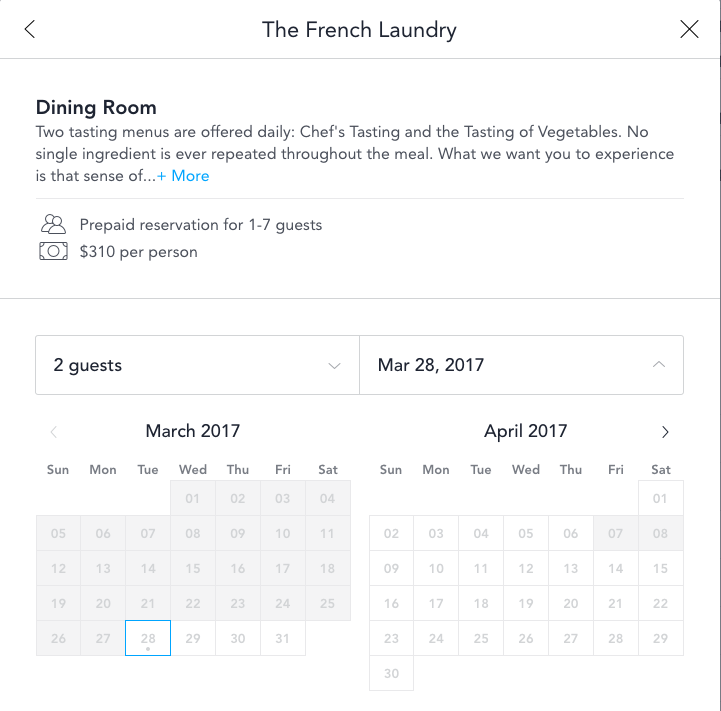
Here's an example (taken today) of the Tocktix interface.

Initially, I think I accidentally tried to make a reservation on March 27 because I actually thought it was just the opening of the calendar month window interface. What I didn't see was that this was further down the screen.
Instead, when I clicked the date, the calendar interface was gone. Same result, sort of, but up until this point, I thought I was making progress. So I clicked on "Add Me to the Wait List."


It was at this moment that I realized that things were unfolding badly for me. I went ahead and added my name to the wait list. At the same time, I was extremely frustrated that I couldn't add anything, no notes or comments, to clarify that this wasn't just any day, that it was my wife's birthday. Sure, I could add us to a wait list a week later, but that day wouldn't be anywhere nearly as important as the first day that I signed up for.

Since that time, I've also realized that there are other issues with the TockTix waiting line system.
  1. I can't tell what position in line that I am.
  2. I can't drop my listing from the wait list, like if say, we decided to cancel the entire trip to Yountville and go somewhere else.
  3. I get no sense of movement or updates from the list. I don't even get an initial confirmation email confirming my place in line. What if all of the other "people" in front of me are ticketing bots?
Needless to say, I my frustration with the entire experience hasn't dissipated.

Prospective Customers and The French Laundry
As a business, The French Laundry doesn't have to care about potential customers in the queue in the same way that some businesses do. As long as they have limited seats and a consistent parade of butts in the seats, and as long as they deliver a premium, desirable experience to them, they don't really need to care about the people in line. If I get frustrated or you get frustrated, who cares. It won't stop the guy behind you from happily filling a seat, given the opportunity. And maybe you're so frustrated that you write a review on Yelp, but you haven't even been there, so your complaints are hollow. In short, even if you say, "they suck," it's pretty unlikely that you're voice will be heard over the din of oohs and ahs from people who have been there. In the end, it doesn't matter. The French Laundry brand will transcend your unhappiness. They don't need you.

For me, this whole experience diminished the brand. Ultimately, that won't matter to you, the next guy in line, or probably anyone considering going to the restaurant.

And so you're probably thinking that, if they called me today and said, we've got a table for you and your wife, I would change my tune. To that, I'd say, you're probably right about going -- we still haven't canceled all of our Yountville plans yet. And at the same time, The French Laundry brand will never hold the same elevated benchmark status for me as it once did. And I think it's unlikely that I ever will go there. I certainly won't pursue reservations or try to get into the line again.

Tuesday, January 3, 2017

The Eroding Mac: Preview Bugs - Yet Another FAIL

So I came across this bit of news on MacRumors today: macOS 10.12.2 Users Urged to Avoid Using 'Work-in-Progress' Preview App to Edit PDFs. Essentially, Apple in new strategic direction has rewritten the PDFKit and broken a bunch of functionality. Not just broken, but broken to the point where several experts are recommending that you don't edit PDF files in Preview.

Why would they release a crappy version of some core functionality? Well, here's what the article says:
Apple wants to use a common foundation for both iOS and macOS. However, it was released way too early, and for the first time (at least in my experience) Apple deprecated several features without caring about compatibility. And to make things worse, lots of former features are now broken or not implemented at all, meaning that we had to add lots of workarounds or implement stuff on our own. And there’s still work left to be done. 
10.12.2 introduces new issues (it seems that Apple wants to fix at least the broken compatibility now) and of course fixed almost none of the other issues.
Once upon a time, desktop Macs and functionality like the PDF engine in Mac OS were important to Apple. While it may seem like minor functionality, the core graphic rendering engine is more than just a free tool for casual users, it's yet another essential component for the professional user class.

The writing is on the wall. The Mac platform is dying and Apple can't shovel dirt on it fast enough.

Thursday, December 15, 2016

Apple Removes "Time Remaining" in New OS Update

Perhaps you might have heard stories about some of the people who'd bought the new MacBook "Pro" models with the Touchbar and nothing but USB-C ports having power problems. Specifically, many people were apparently having extremely short operational life with their new units, like 3-4 hours instead of the "up to 10 hours" number that Apple advertises.

Perhaps that Touchbar is a huge, always on battery suck?

Anyway, Apple released an OS update to address some bugs that are supposed to help with the battery life issue. One of the things that they fixed -- and I saw this on Macrumors before I actually installed the update and saw it in real life -- they removed the "Time Remaining" calculation from the battery utility in the menu bar.

Why? According to MacRumors,
Apple said the percentage is accurate, but because of the dynamic ways we use the computer, the time remaining indicator couldn't accurately keep up with what users were doing. Everything we do on the MacBook affects battery life in different ways and not having an accurate indicator is confusing.
Admittedly, it's true. The time remaining is and always has been inaccurate. It's a guess, sort of like that Mileage calculation that your car makes based on how your driving at the moment. It's performance is pretty crappy when you accelerate -- or launch an app say. Still, to remove it?

It reminds me of a worse version of their solution for the AntennaGate issue, where they just changed the software to not be as dynamic in reflecting your cell signal. Oh, that fixed it...

Seriously, most of us Pro users benefit from having the time remaining -- it's a helpful estimation if your somewhere like, on a long flight with no power. It can give you guidance to turn the brightness down on your display. Or save that presentation rather than starting another slide. It's a much easier to read battery speedometer than percentage.

I put this one in the FAIL category.

Friday, December 9, 2016

Apple Earpods Still Delayed: Wireless Audio - Genius!

I came across this article on Macrumors today noting the continued delay in bringing Apple's Earpod's to market. It seems the technology is still struggling. Here's a quote from the article:
While the exact reason for the delay remains unclear, a person familiar with the development of AirPods told The Wall Street Journal that Apple's troubles appear to be related to its "efforts to chart a new path for wireless headphones," in addition to resolving what happens when users lose one of the earpieces or the battery dies.
All of this is more evidence of the secret behind the decision to remove the "worked for decades" audio port -- Genius. Not the brilliant kind, but the Wile E. Coyote kind.


Or perhaps Super Genius -- as it's pretty obvious seeing the Audio Port train coming...


Monday, December 5, 2016

REI and Online Customer Experience WTF in 3D

For many years, REI has been a business that held a special relationship for me. There were no Recreational Equipment Inc. stores in the south when I moved back out here from Tennessee way back in 1991. REI was a welcome friend to so many awesome aspects of the California experience -- hiking and camping gear, rain and snow gear, rock climbing shoes, and pretty much anything in between. It quickly became my go-to resource for all of my activities here, enabling me to go where the climate suits my clothes.

Among friends over the years, we've often found ourselves in discussions and debates about whether the REI of today is as good as the REI of yesteryear. From discussions with touring cyclists as to whether the REI rain gear was as good as the older Goretex gear from the previous generation of REI rain gear, to musings about the changing nature of the store as fashion seemed to be an increasing emphasis rather than gear.

Myself, I've been a member of REI since 1992 and over the years, I've bought a fair amount of stuff from them. REI has held such a significant role in my life that, often, if there was something that REI carried, I would buy it from them, even if it was slightly cheaper somewhere else. A lot of things figured into this calculation, such as the annual dividend as a discount, and REI's strong return policy. In the old days, there are stories of people returning gear after months and years. In looking at the specifics of their return policy now, that rock-solid guarantee has been reduced to something like a one year warranty. Problems with your REI gear? Good luck with that... Of course, I've never had to return anything I've bought from REI, but the belief that they have a strong return policy is probably a widespread belief. They even referenced REI returns in that Reese Witherspoon movie, Wild.

REI Delivers a Series of Failures
Recently, we'd been in the market for a jogging stroller. We just missed an opportunity to one of the top-rated ones from Target as they were closing out a previous model year. We actually could have probably gotten one, but we decided to visit our local REI store and check them out before we purchased. Suitably impressed, we ran around to various Target locations, but all of the discounted strollers were gone. After more research and study, we decided we would probably just go ahead and purchase the stroller from REI as soon as one of their periodic 20% off one full priced item sales took place. Sure enough, in the weeks before Thanksgiving, REI offered the 20% discount, so after waiting several weeks, we decided to move forward with our purchase.

The first surprise was that while REI used to carry the BOB Flex, they had stopped carrying that model and now only carried the Pro model, about $70 more expensive than the Flex. The Pro model includes a hand-brake, something many online reviews say is somewhat unnecessary. It also ways about 5 pounds more, something we really felt like we didn't need. After discovering this, we took a step back and reviewed all of the different options for jogging strollers. Ultimately, what we decided was that we would go with REI because of our long relationship with the brand, their strong return policy, and because my unused dividend benefit would provide some additional discount on the purchase.

On November 17th, I finally placed the order. We were anxious to pick up the stroller and would have loved to pick it up at one of REI's retail locations, but despite having four REIs in the area, the stroller was unavailable in all of them. They were gone from the Saratoga store where we'd previously looked at them. Our only choice was to order for in-store pick-up. But forget about Amazone Prime or other fast delivery services that you might expect, REI's initial estimate was that the unit would be available for pick-up on Sunday, November 27th.

My gut told me that this date was suspect. One week later -- typical ground shipping would have been Thanksgiviving Thursday, the 24th. Why they couldn't ship product to one of their locations in less than a week was a bit puzzling, but assuming that the timeline was tight -- REI had already published that they would be closed on Black Friday, so assuming a Saturday delivery, Sunday seemed possible, but unlikely.

So as the week or so of waiting went on, I decided to check with REI customer service, since I hadn't received any specific confirmation about pick-up times. Unfortunately, what I discovered during my chat with customer service was that REI had screwed up the order. They reprocessed it, and now my expected delivery date was scheduled for December 4th. As a courtesy, they sent me a $20 REI gift card.

Of course, while they were busy screwing up my order and being closed, Amazon featured the BOB strollers on a black Friday deal for less than we were paying REI (since they offered the Flex that we actually wanted and the Pro for the same discounted price that we got through REI). Instead, thanks to REI, we got to wait an extra week.

Still feeling frustrated with REI, I decided to contact their online chat Customer Support a second time on Friday, Dec. 2. After chatting with the customer service rep and relaying my frustration, his only response was,
REI Customer Service Rep: Occasionally an order may be delayed in our system, entirely our fault. But we would certainly hope our members and customers can understand that we are doing the best we can. When possible we do try to upgrade shipping or make things right.
REI Customer Service Rep: Occasionally these types of errors cannot be helped. Is there something particular regarding your order that I can help you with now?
In short, "bummer for you".

So Sunday, December 4th came, and we decided to head over to the REI store to pick up the stroller. My expectation was that there would be no stroller there since REI's order confirmation says something about expecting an email when the stroller finally arrives, but I thought it was worth a try since they'd given me that date.

What I learned in the store was that, no, the stroller wasn't there and that there was no way the stroller could have been there on the date promised since the store only received shipments on Monday, Wednesday and Friday. In short, REI's own system was making promises and writing checks that it's ass couldn't cash.

This isn't my first frustration with REI this year. Earlier, I went there trying to replace my Teva sandals, something that I'd been resisting doing for a long time. Imagine my surprise when my go-to gear store suddenly didn't have ANY Teva sandals. I wound up replacing my Teva's at Sports Basement.

REI has destroyed their brand loyalty with me
While I'm sure that I will continue to purchase things from REI -- it is one of the only places where some of this gear is available -- the business is no longer my preferred supplier. In a couple of moves, they have eroded all credibility with me. I wish that I could point to a specific reason or mark it as a trend, but I don't have anything like that. This is just one anecdote, but based on my recent experiences, I would advise Caveat Emptor.

Thursday, November 3, 2016

Is Apple "Designing" Their Way Out of Customers?

With the introduction of the new Macbook Pro design, the first thing that struck me -- and I anticipated it coming based on the Macbook design -- was the removal of the MagSafe power connector. The MagSafe connector is one of those little features that's like the envy of everyone in the PC world. It's a brilliant design and a wonderful feature, particularly noteworthy if, like me, you've had at one or two pre-MagSafe Apple laptops (like my old WallStreet) that suffered from broken power jacks. In contrast, I can't count the number of times that the MagSafe has saved my computer, the power jack and whatever my computer was resting on.

So I was going to write this blog post -- sort of a eulogy to the end of an era of design brilliance -- that talked about Apple and lamented these new Macbook Pros. But I thought I was probably the only one, and then I came across this link on MacRumors. The post highlights complaints about the new systems and Apple following the new Macbook Pro announcements. But what really struck me was this linked post, New MacBook Pros and the State of the Mac, a grand list of complaints about the new systems and Apple.
  • Carried across all of those extracted snippets are echos of my response to the new designs. Some highlights:
  • USB-C sucks. It sucks because it doesn't directly work with any existing peripherals without an adapter. It sucks because it's not MagSafe. And, from this post I learned that it sucks because apparently you can't just use one cable to connect things for all of the different supported interconnects (Thunderbolt, USB, Power) and if you do, it will fry your stuff.
  • MacBook Pro 2016 performance specs are only slightly better than MacBook Pro 2012. 
  • AppleTouch Bar. Meh.
  • Consider, my 15" MBP that is my work system -- 2 USB, 2 Thunderbolt, 1 HDMI, 1 Memory Card Reader and MagSafe connector -- it's like the MacBook Pro has always been, the Swiss Army Knife of computers (despite the required Ethernet and display dongles).
  • A Headphone port because, "These are pro machines." I'm so glad all of those work calls I might make on my iPhone are just "consumer" calls. Then again, that's why I upgraded to an iPhone 5SE. 
  • The general consensus is that pro is a misnomer and that Apple has abandoned the creative pro and the developer user market. 
Are we all destined to hunt for Apple's older product designs?

Friday, June 24, 2016

Enterprise Car Rental: Customer Lip Service

As I wrote a couple of weeks ago, I was finally contacted by Enterprise Car Rental. Back at the beginning of June, I spent some time on the phone with Jose, who claimed to be a regional manager for Enterprise in the Miami region. Jose listened, he was apologetic, and he told me that he would take care of everything for me. He also asked for my home address, the implication being that he was going to send me something as a symbolic apology. I also asked for a complete postmortem in an email.

And so, I left it there, waiting to see what Enterprise would do, what their response was. And, as things happen, I was very busy over the next couple of weeks. But I didn't forget. A week or so ago, I even called Jose on the cell number that he provided me, and left a voice mail requesting follow-up.

Since we first spoke, however, I have not heard anything nor received anything. Enterprise still has not credited my card for the incorrect charges. In short, they haven't done anything.

Earlier this week, I tweeted multiple follow-ups to @enterprisecares. They told me that they would follow up with Miami. To date, I still haven't received any response.

As I mentioned on Twitter, Enterprise Car Rental has inspired me to add a new tag to my blog, Customer Lip Service. This is one of those when they say that they'll take care of you in an attempt to make you feel better, but don't actually follow up with any real action. Remember when Iomega customers actually had to sue the company (and win) in order to get support for their ZIP Drives?

If you're considering renting a car, you should seriously consider this customer experience horror story as a cautionary tale.

Wednesday, June 1, 2016

Enterprise Car Rental Update: Still No Response. No Escalation?

So it's been over a week since I first raised this issue with Enterprise customer service through @Enterprise and @Enterprisecares on Twitter. On Monday night, I was informed by one customer service agent that they had created a case. On Friday morning, I was informed that my case was submitted a second time.

When you're setting up Salesforce.com, the default length of time for case escalation is 3 days. While I don't recall whether there was a default escalation schedule in Zendesk, there is no question that customer service CRM tools all recognize the importance of operating in a timely fashion.

For those that might not be familiar with it, case escalation essentially raises the importance of a case. When you first contact customer service at an organization using a customer service CRM, they typically create a case to track your issue. All of your communications with the company go there. There's also a status tracker that references what stage in the process of solving your problem the issue is in. Most cases are working toward a process stage of Closed - Solved. This is the customer service equivalent of a Sales Opportunity being Closed - Won.

This is why when you deal with some customer service organizations, they will specifically say something like, "Have I answered all of your questions" or "Is there anything else", followed by a "then can I mark this issue as closed" or something to that effect.

Escalation is the process where certain cases trigger automatic alerts, typically to managers who are supposed to have the oversight to step in and make sure certain kinds of issues don't get out of hand. Since many customer service contacts can be for fairly minor things, good customer service organizations use these tools to help prevent issues "falling through the cracks". The last thing you need is to contact Comcast for help setting up your cable, only to have them forget about you for a month. These are the kinds of things that alienate customers.

Customer service queuing is why customer service software is often used to send out status updates. It's a whole lot easier for you to feel like you're being taken care of when somebody informs you of their progress along the way. Imagine if you went to the customer service department in a store and the clerk listened to your story, said "I'll be back," and disappeared. How long would you wait before becoming frustrated? One hour? Less? Would you wait through the end of the day? Would you come back the next day?

So when you see things like my issue with Enterprise Car Rental, as you watch their customer service act and respond, you can't help but compare many of these actions to industry standard practices. These practices are not unknown. And when I asked their customer service about them over Twitter, they confirmed several aspects of them. This is not some 'Mom-n-Pop' organization. So where's the sense of progress? Where are my status updates? Where's my escalation?

And while it may seem crazy to be this dogged about something as minor as a $30 overcharge, it's important to remember -- this is the same customer service mechanism that you would deal with if something far worse had happened. For example, what if they were claiming damage to the vehicle or that, despite turning the vehicle in at an Enterprise Rental Car return, that they hadn't received the car and that it was missing? All of the gloss and friendliness at the front end of the rental counter doesn't mean anything if the customer service back-end sucks.

Friday, May 27, 2016

My Weird Bad Experience With Enterprise Car Rental

So I just wrapped up a busy two weeks of travel, mostly business, but some vacation. Travel seems to bring out lots of terrible customer service experiences. There are probably a number of reasons for this. When you're at home, you have routines and you probably frequent known businesses that deliver a predictable level of service. When you travel, you're probably dealing with new places, new businesses and your dealing with reviews, reputations and brands that you hope can ensure that you have quality experiences.

In many ways, this is where brands are supposed to thrive. If you're at home in the bay area, you can count on Philz, Peets, or Blue Bottle for quality coffee, but when you're in a town that you don't know, if there is a Starbucks, at least you can count on getting coffee that doesn't suck. Brands are brands because the commit to ensure a level of service and quality -- or that's the theory.

My Crazy, You-Don't-Want-This-to-Happen-to-You Enterprise Car Rental Experience
I've rented from Enterprise Car Rental many times over the years, probably back as far as the early 1990s. While my business travel has had me renting from many companies, I often found myself gravitating back to Enterprise for the lower prices, car offerings, and sometimes they even used to pick you up. One of the things that I was always disappointed with them for was that, for many years, I don't think they had a loyalty program. Several years ago, I finally found their loyalty program and signed up. With many of these things, I never wind up actually using the points, but often the business treats you a bit better because you're signed up.

So anyway, last week was Miami, with a long drive up Florida to visit Jacksonville with my wife. My wife's corporate rate with Avis is really good, so we were surprised when I got a car rental rate that was WAY lower from Enterprise. Enterprise was offering an $7.95 per day rental for a pick-up in Miami and drop off in Jacksonville. My three day rental with unlimited mileage was under $25. Whenever I told anyone how much I was quoted, they were also shocked. It was one of those rates that made me happy -- thrilled -- to be renting from Enterprise.

So we picked up the car on Thursday. It was the usual process of attempting to upsell me on insurance and Florida tolls, but other than that, nothing different from any other car rental that I've ever done. Then the quick inspection, and we were off in a nice new Toyota RAV4. Leaving the Miami metro area, I was halfway kicking myself about not spending the extra $4 for the automated toll coverage so I could escape a little bit of the traffic on I-95, but other than that, it was a pretty uneventful drive.

Fast forward to Saturday morning where we dropped off the car with way more gas than we needed to (only needed half a tank, but the RAV4 gas tank is actually kind of small). Through the usual drop off line at the airport, then the attendant asks if I'd like a copy of the receipt. I said yes, at which point she told me I needed to go the attendant in the Enterprise office there -- something we didn't really want to do since we were anxious to get through security and be ready for our flight. Thinking that it wouldn't be a problem -- I've had car rental receipts emailed to me on many occasions -- I asked if she could email the receipt and she said yet.

Two days later, Monday, May 23 at 6pm I finally received my receipt. The receipt claimed that I had had the car until nearly 2:00pm that Monday, putting me in a five day rental at $55. It goes without saying that my wife and I, having dropped the car at the airport, had been in New Orleans since Saturday, so the idea that I was being charged for two days that I didn't use the car was, in a word, bullshit.

Now, if you aren't really too worried about it, you might think that $55 was a reasonable amount to pay to drive a rental car from Miami to Jacksonville. You might be willing to let the $30 delta slide. But the problem that I have is that we did nothing different that we haven't done 100 times, with Enterprise and other rental car companies. It was standard operating procedure. And so the idea that for some unexplained reason, Enterprise would change the rules this time and surprise me with an unwarranted charge -- I really needed to get an explanation.

Enterprise Customer Service SUCKS
So I called Enterprise Customer Service using the toll free contact number published on their web site. After receiving my confirmation number, the customer service rep told me that there was nothing he could do and that I would have to call the Miami office where I rented the vehicle once they were open (on East Coast Time). He didn't seem to have any ability to log a case, couldn't provide me with a case number, and didn't seem to be willing to do anything other than essentially say, "man, that's a bummer. I'm sorry your frustrated. I can't do anything."

At this point, my frustration had amplified, so I got on Twitter and began telling my story, curious to see if Enterprise Car Rental monitored Twitter. About a half an hour after I started posting comments on Twitter to @enterprise and @enterprisecares, I finally received response with a request to send their customer service my confirmation number. After some back and forth with Enterprise customer service through Twitter direct messages, I was informed that "I sent your comments and concerns, and your contact information, to the Miami regional office for review and response. A manager will contact you as soon as possible," and a reference number was assigned.

Three days later, and I still haven't heard anything from Enterprise Car Rental. As soon as possible doesn't seem to mean what you might think it means. At this point, I'm left feeling like Enterprise Car Rental is trying to rip me off -- and the ironic part is that it's for about $30. Keep in mind that I'm a points-holding member of their loyalty program who, before having this billing dispute, would have likely been a huge recommender for Enterprise Car Rental. Now, I question whether they're going pull some crazy shit when you turn your car in. And I most certainly would get a receipt before I leave!

As I mentioned on Twitter, "this is the critical interrelationship between customer service and marketing." Right now, I'm questioning my entire relationship with Enterprise Car Rental. That affects not just one location in one state, but other locations and other potential business. In one customer service moment, Enterprise could have looked at this and said, "hah, some crazy clerical error, clearly not worth the $30 to even argue it." But instead, they send me into some shitstorm of a bureaucratic devil's triangle, where the issue just seems to get lost. @enterprisecares. Except they forgot to close the <satire> tag.

How do you think things like this promotional email from Enterprise will work with me going forward?
DRIVE AWAY WITH SAVINGS AND POINTS
Save 20%.
We miss you. Come back and save 20% at participating locations. You can earn valuable points toward free rental days.  
As a business, how much do you think Enterprise's marketing group is spending on ExactTarget for email marketing? And then, to watch that spend get kneecapped by their customer service? It's got to be frustrating. After all, could any number of "We miss you" emails overcome one bad customer service experience? From the marketing end of the business, all we can say is unbelievable. For about $30. It really sounds like a joke doesn't it.

This, my friends, seriously deserves a #FAIL tag.


Thursday, November 19, 2015

Wired Looks at iTunes Alienation of Music Lovers

I've written about it a number of times before, Apple has taken a design and product strategy that is alienating and abandoning many of their most passionate users. In Apple’s iTunes Is Alienating Its Most Music-Obsessed Users, Jesse Jarnow explores how iTunes has evolved into a platform that sucks for people with giant music libraries. Earlier this year, I'd come across an article with related complaints held by classical music fans.

Essentially, all of the crap that they've added into iTunes, plus this overwhelming requirement for iTunes to phone home to Apple, really sucks if you've built a music library. In that way, the core functionality of iTunes has been superseded by stuff that doesn't really relate to music library at all.

If you think about that on an abstract level, this product that used to cater to a very specific set of requirements -- typically the most demanding, passionate users of an application -- has evolved into a giant business engine shaped around promoting selling you crap that they want to sell you. This is less aligned with Steve Jobs, the guy that took days and weeks to decide on the right washing machine, and more aligned with the fluff and seasonality of the fashion industry.

Tuesday, October 20, 2015

New Salesforce.com Winter'16 Data/Lead Import Engine FAIL!

I just got done hacking my way through the new data import wizard in Salesforce.com's recently released Winter16 update. It's mind-boggling. What a piece of crap this thing is. They have attempted to make it more "Lightning" like, but in doing so, they've managed to add a tremendous overhead to the process. So let's talk about the stupid stuff that they've done:
  • Added a "gamefied" progress bar at the top of the screen to let you know where you are in the process. 
  • Field mapping is graphically enhanced, but if you happened to leave an empty column in your spreadsheet, forget about ignoring it. The idiotic tool stands like a moronic Gandalf -- "no mapping for Department? You shall not pass!"
  • So you update the file and then you discover that, "Lead Status" is a required field. Sure every lead you've ever imported assigns "Open" to new leads, but not Salesforce's brilliant new lead import engine. Instead, you need to add a field or you get the moronic Gandalf again. 
It took me nearly four passes just to import one lead. So far, my observations -- Winter16, you suck! New data import engine, EPIC FAIL!

Friday, October 16, 2015

Confirmed at Apple Store: iPhone 6s Reservation System Sucks

With all of the frustration that I've been having with Apple's terrible online reservation system, I was a little worried that I might be complaining a lot while being stupid -- that if I just went over to the store, I could wait in a line that would give me access to a separate lot of inventory that was different that the online reservation system inventory.

However, any optimism on my part was quickly squashed with a visit to the Apple Store. What I learned / confirmed:
  • The only inventory available in the store each day is through the online reservation system.
  • There is no line at the store. The reservation system is supposed to help save you a trip to the store
  • There is no way to do the leasing / upgrade program without purchasing in the store.
  • There was virtually no surprise at my frustration with the online reservation system from the clerk at the store working the door.
But probably the number one thing that I confirmed with a trip to the Apple Store is that the online reservation system SUCKS.

It really is kind of astonishing to me how a brand that I used to value so highly could become one that generates such anger in me now.

AT&T Wireless Customer Service FAIL

A funny thing happened on the way to pay my AT&T Wireless bill. It turned into a great example of a customer service FAIL.

It all started back in July when my cell phone bill was due and, for whatever reason, my credit union's ability to process credit cards went down for the morning. I tried to pay my AT&T bill using the iPhone app and the payment kept not going through.

Because I was in the middle of set-up for a tradeshow, it was important to me that my cell service not be interrupted, I added a payment option to do a direct pay from my credit union checking account. And, thinking I was tired of the hassle of going through the steps to pay each month, I decided to set up auto-pay.

About a month later, I started receiving notices that my bill was past due. So I called AT&T. After working with their customer support, they confirmed that auto-pay was set up, and suggested that it would probably be a couple of days and the payment would go through. Just an issue between "billing day" and "payment day" that should resolve after the weekend. And the customer service rep told me he added a note to my file about the issue.

A couple of weeks later, AT&T started calling me again, letting me know that my bill was now very past due. And so I called again. This customer service rep told me that it usually takes one or two billing cycles before auto-pay kicks in. According to this one, the last guy didn't tell me about the delay. My options at this point were to pay this one and by next month or so, auto-pay should have kicked in.

So you're probably not surprised to learn that AT&T was calling me again last week. Nor will it surprise you that my bill was past due AGAIN. So this morning, I stayed on the line to talk to another customer service rep. She started the call ready to take my payment. When I explained some of the back story, she looked it up. Note, I find it surprising that they don't make this case history information more visible in their call screens. Anyway, after going back through it, she explained that it looked like their system had tried to process the payment, then gone to sleep. It would still need another two billing cycles before it would kick-in. Her suggestion was that I could pay October and November and that, by that time, auto-pay should work.

Now, it's important to keep in mind that I used their system as it's set up and, at no time had it successfully work. However, I find it laughable that I should keep dancing around, trying to make their crappy system work. Somehow, this is my problem? This is a customer service FAIL. It was all I could do to refrain from yelling at the customer service rep. At the same time, I felt bad for her. AT&T's shitty system put her on the front lines of a complete flounder.

And worse than that -- after going through all of this AND paying my bills, what compensation does AT&T offer me for their system not working? Nothing.

AT&T, your customer customer service SUCKS. Nice people on the front lines to not overcome a shitty infrastructure or shitty practices.

One Week Later, iPhone 6s Reservation System Still Sucks

I've been out of town for a week, so I didn't bother playing the iPhone 6s reservation system game all week. This morning, I dove in for a new round only to see that Apple's system still sucks. This morning I actually thought I reserved a device at Stanford only to be denied then returned to Stanford as an option for a second chance at reserving it -- which likewise failed.

My best guess is that Apple has some sort of widget or cross-site authentication working that my browser blocks (as I run a fairly locked down browser).

On a side note, while watching some television show or another, I happened to notice one of the characters using an iPhone and, probably because of the timing of when it was filmed, the older iOS interface was displayed on the device. It's an annoying reminder that, once upon a time, the iPhone used to be the best phone ever. And yet now, simply because of the user interface, I often find myself wanting to throw my iPhone across the room -- particularly after a number of repeated attempts to active some control that requires an extremely precise interaction with the touchscreen. That's the way that they've designed the new UI. Terrible.